• The Power of Roles for Data Segregation

    A robust data governance model is crucial for any organization. You need to ensure that users can only access the data they are authorized to see, creating a secure and well-managed data environment.

    This demonstration will follow on from Mahdi Askari’s post showcasing how Snowflake’s Role-Based Access Control (RBAC) provides a powerful and flexible way to achieve data isolation and controlled data access.

    We will use the standard TPC-H dataset, accessed via a shared database, to create a realistic scenario. We’ll build a dedicated governance layer using views, and then apply permissions to two distinct business roles.

    We’ll see how these roles provide separate, isolated views of the data, how we can enforce that isolation by disabling secondary roles, and how they can be combined for higher-level analysis only through explicit permission

    The Scenario

    Imagine two departments in a company:

    1. Finance: Analysts in this department are concerned with revenue, pricing, and order totals. They need access to customer orders and line item data.
    2. Logistics: Analysts in this department manage the supply chain. They need access to information about suppliers and the parts they provide.

    Our goal is to give each department access to only the data they need, prevent them from combining these permissions on their own, and allow a manager to see the combined picture.

    Snowflake RBAC Demonstration

    Here is the step-by-step SQL code to set up and demonstrate this scenario in a Snowflake worksheet.

    1. Setup: Prepare the Environment

    First, we’ll use the ACCOUNTADMIN role to create a new database and schema that will serve as our governance layer.

    -- Use the ACCOUNTADMIN role for initial setup
    USE ROLE ACCOUNTADMIN;

    -- Create a new database for our demo objects
    CREATE OR REPLACE DATABASE TPCH_SAMPLE;
    USE DATABASE TPCH_SAMPLE;

    -- Create a schema to hold the views
    CREATE OR REPLACE SCHEMA DEMO_VIEWS;
    USE SCHEMA DEMO_VIEWS;

    -- Create a warehouse to run queries
    CREATE OR REPLACE WAREHOUSE DEMO_WH
    WAREHOUSE_SIZE = 'XSMALL'
    AUTO_SUSPEND = 60
    AUTO_RESUME = TRUE;

    USE WAREHOUSE DEMO_WH;

    2. Create Views as a Governance Layer

    Instead of granting access directly to the shared data, we’ll create views. This could easily be done on base tables but since this is an open dataset, this is just helps illustrate the example without having to load any additional data.

    -- Create views pointing to the shared TPC-H data
    -- This assumes the share is named SFSALESSHARED_SFC_SAMPLES_AU_SAMPLE_DATA
    -- and you have the necessary import privileges.
    CREATE OR REPLACE VIEW ORDERS AS SELECT * FROM SFSALESSHARED_SFC_SAMPLES_AU_SAMPLE_DATA.TPCH_SF1.ORDERS;
    CREATE OR REPLACE VIEW LINEITEM AS SELECT * FROM SFSALESSHARED_SFC_SAMPLES_AU_SAMPLE_DATA.TPCH_SF1.LINEITEM;
    CREATE OR REPLACE VIEW CUSTOMER AS SELECT * FROM SFSALESSHARED_SFC_SAMPLES_AU_SAMPLE_DATA.TPCH_SF1.CUSTOMER;
    CREATE OR REPLACE VIEW PART AS SELECT * FROM SFSALESSHARED_SFC_SAMPLES_AU_SAMPLE_DATA.TPCH_SF1.PART;
    CREATE OR REPLACE VIEW SUPPLIER AS SELECT * FROM SFSALESSHARED_SFC_SAMPLES_AU_SAMPLE_DATA.TPCH_SF1.SUPPLIER;
    CREATE OR REPLACE VIEW PARTSUPP AS SELECT * FROM SFSALESSHARED_SFC_SAMPLES_AU_SAMPLE_DATA.TPCH_SF1.PARTSUPP;
    CREATE OR REPLACE VIEW NATION AS SELECT * FROM SFSALESSHARED_SFC_SAMPLES_AU_SAMPLE_DATA.TPCH_SF1.NATION;

    3. Create the Business Roles

    Now, we’ll create our two distinct roles and grant them to SECURITYADMIN so it can manage them.

    -- Create the Finance Analyst role
    CREATE OR REPLACE ROLE FINANCE_ANALYST;

    -- Create the Logistics Analyst role
    CREATE OR REPLACE ROLE LOGISTICS_ANALYST;

    -- Grant the new roles to SECURITYADMIN so it has permission to grant them to users.
    -- This is a key step to avoid the "role does not exist or not authorized" error.
    GRANT ROLE FINANCE_ANALYST TO ROLE SECURITYADMIN;
    GRANT ROLE LOGISTICS_ANALYST TO ROLE SECURITYADMIN;

    4. Grant Selective Permissions to Each Role

    This is the core of data isolation. We grant SELECT privileges on the newly created views to each role.

    -- Grant permissions to the FINANCE_ANALYST role on the views
    GRANT SELECT ON VIEW TPCH_SAMPLE.DEMO_VIEWS.ORDERS TO ROLE FINANCE_ANALYST;
    GRANT SELECT ON VIEW TPCH_SAMPLE.DEMO_VIEWS.LINEITEM TO ROLE FINANCE_ANALYST;
    GRANT SELECT ON VIEW TPCH_SAMPLE.DEMO_VIEWS.CUSTOMER TO ROLE FINANCE_ANALYST;
    GRANT USAGE ON DATABASE TPCH_SAMPLE TO ROLE FINANCE_ANALYST;
    GRANT USAGE ON SCHEMA TPCH_SAMPLE.DEMO_VIEWS TO ROLE FINANCE_ANALYST;
    GRANT USAGE ON WAREHOUSE DEMO_WH TO ROLE FINANCE_ANALYST;


    -- Grant permissions to the LOGISTICS_ANALYST role on the views
    GRANT SELECT ON VIEW TPCH_SAMPLE.DEMO_VIEWS.PART TO ROLE LOGISTICS_ANALYST;
    GRANT SELECT ON VIEW TPCH_SAMPLE.DEMO_VIEWS.SUPPLIER TO ROLE LOGISTICS_ANALYST;
    GRANT SELECT ON VIEW TPCH_SAMPLE.DEMO_VIEWS.PARTSUPP TO ROLE LOGISTICS_ANALYST;
    GRANT USAGE ON DATABASE TPCH_SAMPLE TO ROLE LOGISTICS_ANALYST;
    GRANT USAGE ON SCHEMA TPCH_SAMPLE.DEMO_VIEWS TO ROLE LOGISTICS_ANALYST;
    GRANT USAGE ON WAREHOUSE DEMO_WH TO ROLE LOGISTICS_ANALYST;

    5. Demonstrate Data Isolation

    Let’s create a user and assign them these roles to test the isolation by querying the views.

    -- Create a test user (or use your own) and grant them the roles
    USE ROLE SECURITYADMIN;
    CREATE OR REPLACE USER DEMO_USER PASSWORD='<password>' DEFAULT_ROLE=FINANCE_ANALYST DEFAULT_SECONDARY_ROLES = ();
    GRANT ROLE FINANCE_ANALYST TO USER DEMO_USER;
    GRANT ROLE LOGISTICS_ANALYST TO USER DEMO_USER;

    CREATE OR REPLACE SESSION POLICY prod_env_session_policy
    SESSION_IDLE_TIMEOUT_MINS = 30
    SESSION_UI_IDLE_TIMEOUT_MINS = 30
    ALLOWED_SECONDARY_ROLES = ()
    COMMENT = 'session policy for user secondary roles ';

    ALTER USER DEMO_USER SET SESSION POLICY prod_env_session_policy;

    Now, let’s test what this user can see by switching roles.

    (In a real scenario, the user DEMO_USER would log in. For this demo, we’ll switch our own role). If you are not changing to the user, run the below for the actual user

    ALTER USER <yourusername> SET SESSION POLICY prod_env_session_policy;
    -- Switch to the FINANCE_ANALYST role
    USE ROLE FINANCE_ANALYST;

    -- This query SUCCEEDS because the role has access to the ORDERS view
    SELECT O_ORDERKEY, O_TOTALPRICE
    FROM TPCH_SAMPLE.DEMO_VIEWS.ORDERS
    LIMIT 10;

    -- This query FAILS because the role does NOT have access to the SUPPLIER view
    SELECT *
    FROM TPCH_SAMPLE.DEMO_VIEWS.SUPPLIER
    LIMIT 10;

    You will receive an error like: “SQL compilation error: Object ‘SUPPLIER’ does not exist or not authorized.” on the second query

    -- Now, let's switch roles and try again
    USE ROLE LOGISTICS_ANALYST;

    -- This query now FAILS because the logistics role can't see the ORDERS view
    SELECT O_ORDERKEY, O_TOTALPRICE
    FROM TPCH_SAMPLE.DEMO_VIEWS.ORDERS
    LIMIT 10;
    -- You will get the same "does not exist or not authorized" error.

    -- This query now SUCCEEDS because the role has access to the SUPPLIER view
    SELECT S_SUPPKEY, S_NAME, S_NATIONKEY
    FROM TPCH_SAMPLE.DEMO_VIEWS.SUPPLIER
    LIMIT 10;

    This clearly shows that the user’s view of the available data changes instantly and completely just by switching their active primary role.

    Snowflake can allow multiple roles to have specific roles, but we set a policy above to enforce only one role at a time. If a user tries to do:

    USE ROLE LOGISTICS_ANALYST;
    USE SECONDARY ROLE ALL;

    they will get an error:

    “Statement successfully executed. Not all secondary roles are activated due to the session policy associated with the user or account. Use the CURRENT_SECONDARY_ROLES function to see which secondary roles are activated.”

    If they tried to run data against both datasets they will get an error:

    “Object ‘TPCH_SAMPLE.DEMO_VIEWS.LINEITEM’ does not exist or not authorized.”

    6. Combine Roles for Higher-Level Access (The “Right” Way)

    Now we show the sanctioned method for a manager to see data from both finance and logistics: a dedicated hierarchical role.

    -- Use a higher-level role to create the manager role
    USE ROLE ACCOUNTADMIN;
    CREATE OR REPLACE ROLE SENIOR_MANAGER;

    -- Grant the analyst roles to the manager role. This creates a hierarchy.
    -- The SENIOR_MANAGER role inherits all permissions from the roles granted to it.
    GRANT ROLE FINANCE_ANALYST TO ROLE SENIOR_MANAGER;
    GRANT ROLE LOGISTICS_ANALYST TO ROLE SENIOR_MANAGER;

    -- Grant this new role to our user
    USE ROLE SECURITYADMIN;
    GRANT ROLE SENIOR_MANAGER TO USER DEMO_USER;


    -- Now, let's test the combined access
    USE ROLE SENIOR_MANAGER;

    -- As the SENIOR_MANAGER, we can now join views from both domains!
    -- Let's find the total price of line items for all suppliers across orders
    SELECT
    s.s_name AS supplier_name,
    SUM(l.l_extendedprice * (1 - l.l_discount)) as total_revenue
    FROM TPCH_SAMPLE.DEMO_VIEWS.LINEITEM l
    JOIN TPCH_SAMPLE.DEMO_VIEWS.SUPPLIER s ON l.l_suppkey = s.s_suppkey
    JOIN TPCH_SAMPLE.DEMO_VIEWS.ORDERS o ON l.L_ORDERKEY = o.o_orderkey
    GROUP BY 1
    ORDER BY 2 DESC
    LIMIT 10;

    This query succeeds because the SENIOR_MANAGER role inherits the SELECT privileges on the necessary views.

    Why This Can’t Be Done on Databricks

    Databricks has a data governance model with Unity Catalog, but its approach is fundamentally different.

    1. No Dynamic Role Switching: The core of the Snowflake demo is executing USE ROLE <rolename>; to instantly change a user’s entire data access context. Databricks does not have this concept of easily switchable, session-level roles that redefine data visibility.
    2. No Concept of Secondary Role Control: The ability to explicitly enable or disable the combining of permissions at the user level via USE_SECONDARY_ROLES is a feature unique to Snowflake’s security model. It provides an extra layer of administrative control over how permissions are exercised in a session.
    3. Focus on Object ACLs, Not Role Hierarchy:

    Snowflake: Privileges are granted to roles, and roles are granted to other roles. This creates a natural hierarchy that mirrors an organizational chart (Analyst -> Manager).

    Databricks (Unity Catalog): Privileges are granted on securable objects (like tables) to principals (users or groups). While you can create groups that mirror roles, the powerful inheritance model where one role “contains” another is not the primary mechanism. To achieve this, you would typically grant a “manager” group access to a wider set of objects than an “analyst” group.

    Since a user inherits all permissions on login, it is challenging to provide data segregation without seperate accounts or logins.

    Conclusion

    For use cases centered around creating distinct, isolated data environments that map to an organizational structure, Snowflake’s RBAC model is exceptionally intuitive. The ability to create hierarchical roles, allow users to dynamically switch between them, and explicitly control the use of secondary roles provides a seamless and highly governable way to manage data access.

    While Databricks Unity Catalog offers access control, it solves the problem differently. The Snowflake approach, as demonstrated, allows for direct for implementing organization-based data segregation and aggregation with strict administrative oversight.

    In my next blog posts, I will focus on other unique Snowflake governance characteristics that are critical for enterprise security and controls

  • Why True RBAC Matters!!

    Why True RBAC Matters!!

    The Case for Snowflake’s Superior Access Control Model

    In the evolving landscape of data platforms, Role-Based Access Control (RBAC) has become a critical differentiator. While many platforms offer access control features, few implement true RBAC with the sophistication and elegance of Snowflake. This post explores why proper role-based security architecture matters and demonstrates how Snowflake’s approach surpasses alternatives like Databricks’ group-based model.

    The Foundation: Why Databases Need Sophisticated RBAC

    The Enterprise Security Challenge

    Modern data platforms are the backbone of business intelligence, housing everything from customer data to financial records. The stakes for proper access control have never been higher:

    • Regulatory Compliance: GDPR, HIPAA, SOX, and other regulations demand granular access controls
    • Data Breach Prevention: Limiting access reduces attack surface and insider threats
    • Operational Efficiency: Proper permissions prevent data corruption and unauthorized modifications
    • Audit Requirements: Clear permission trails are essential for compliance reporting

    Beyond Simple Permissions: The Need for Roles

    Individual user permission management becomes unwieldy at scale. Roles provide the abstraction layer that makes enterprise security manageable, auditable, and maintainable.

    Roles vs Groups: A Critical Architectural Distinction

    The confusion between roles and groups has led many organizations to implement suboptimal security models. Understanding this distinction is crucial for proper RBAC implementation.

    Groups: Organizational Identity Containers

    Groups represent who users are within an organization:

    • Departmental affiliations (Engineering, Sales, HR)
    • Geographic locations (US-East, EU-Central, APAC)
    • Project teams (DataMigration2024, CustomerAnalytics)

    Roles: Functional Permission Containers

    Roles define what users can do within the system:

    • Data access levels (ReadOnlyAnalyst, DataScientist, DatabaseAdmin)
    • Business functions (FinancialReporter, CustomerServiceRep, AuditViewer)
    • Technical capabilities (ETLDeveloper, MLModelBuilder, SchemaDesigner)

    The Enterprise Advantage of Separation

    This architectural separation provides:

    • Flexibility: Users can have multiple organizational affiliations and functional roles
    • Maintainability: Role permissions can evolve without affecting organizational structure
    • Compliance: Clear audit trails separating identity from function
    • Scalability: Role-based permissions scale with organizational growth

    Databricks Groups: The Limitations of a Hybrid Approach

    Databricks attempts to solve access control through groups, but this approach reveals fundamental architectural limitations.

    The Databricks Group Model

    -- Databricks group creation
    CREATE GROUP data_analysts;
    CREATE GROUP finance_team;
    CREATE GROUP ml_engineers;
    -- Permission grants to groups
    GRANT SELECT ON schema.customer_data TO data_analysts;
    GRANT ALL PRIVILEGES ON schema.financial_data TO finance_team;
    GRANT CREATE TABLE ON schema.ml_workspace TO ml_engineers;
    -- User assignment
    ALTER GROUP data_analysts ADD USER john.doe@company.com;

    Critical Limitations of the Databricks Approach

    Semantic Confusion: Groups serve dual purposes, creating ambiguity between organizational identity and functional permissions. This leads to groups like “finance_team” that mix departmental identity with data access rights.

    Limited Flexibility: Users can belong to multiple groups, but there’s no clear hierarchy or inheritance model. This creates permission sprawl and makes it difficult to understand what access a user actually has.

    Maintenance Overhead: As organizations grow, the number of groups proliferates exponentially. Without proper role abstraction, administrators must manage an ever-growing matrix of group-to-permission mappings.

    Audit Complexity: When groups represent both identity and function, audit trails become convoluted. It’s difficult to answer questions like “Who has access to financial data?” or “What can John Doe actually do?”

    Workspace Fragmentation: Many Databricks permissions are workspace-specific, creating silos and inconsistent access patterns across the platform.

    Snowflake’s Superior RBAC Architecture

    Snowflake implements true RBAC with a sophisticated, enterprise-grade architecture that addresses all the limitations of group-based systems.

    The Snowflake Role Model

    -- Role creation with clear functional purpose
    CREATE ROLE data_analyst;
    CREATE ROLE senior_data_analyst;
    CREATE ROLE financial_data_reader;
    CREATE ROLE customer_data_analyst;
    -- Sophisticated role hierarchy
    GRANT ROLE data_analyst TO ROLE senior_data_analyst;
    GRANT ROLE financial_data_reader TO ROLE senior_data_analyst;
    -- Granular permission assignment
    GRANT SELECT ON schema.customer_data TO ROLE customer_data_analyst;
    GRANT SELECT ON schema.financial_data TO ROLE financial_data_reader;
    GRANT CREATE VIEW ON schema.analytics TO ROLE data_analyst;
    -- Flexible user-role assignment
    GRANT ROLE data_analyst TO USER john.doe;
    GRANT ROLE financial_data_reader TO USER john.doe;
    GRANT ROLE customer_data_analyst TO USER jane.smith;
    -- Dynamic role switching
    USE ROLE data_analyst;
    USE ROLE financial_data_reader;

    Snowflake’s Architectural Advantages

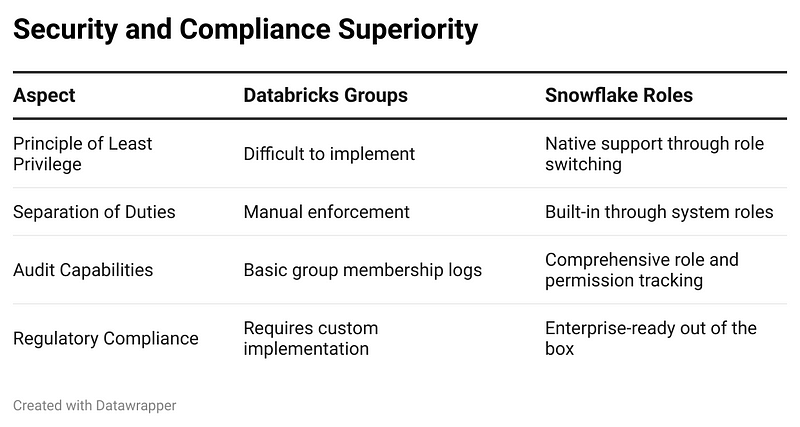
    True Role Hierarchy: Snowflake supports sophisticated role inheritance, allowing senior roles to inherit permissions from junior roles. This creates a natural progression of access that mirrors organizational structure while maintaining functional clarity.

    Multiple Concurrent Roles: Users can hold multiple roles simultaneously and switch between them as needed. This flexibility is essential for modern data professionals who wear multiple hats.

    Session-Level Security: The ability to switch roles within a session provides fine-grained security control. Users can operate with minimal permissions by default and elevate only when necessary.

    Built-in Governance: Snowflake includes system roles (ACCOUNTADMIN, SYSADMIN, SECURITYADMIN) that provide clear separation of administrative duties, a critical requirement for enterprise governance.

    Comprehensive Audit Trail: Every role assignment, permission grant, and role switch is logged, providing complete visibility into who has access to what and when.

    Why Snowflake’s Approach Wins: A Detailed Comparison

    Operational Excellence

    Snowflake’s role model reduces administrative overhead through:

    • Clear role inheritance reducing permission duplication
    • Systematic approach to permission management
    • Built-in governance through system roles
    • Comprehensive logging and monitoring

    Databricks requires significant custom development to achieve similar governance capabilities:

    • Custom tooling for permission auditing
    • Manual processes for role lifecycle management
    • Complex group hierarchies that become unwieldy at scale

    Scalability and Flexibility

    Snowflake’s architecture scales naturally with organizational growth:

    • Role Templates: Standard roles can be replicated across departments
    • Dynamic Inheritance: New roles can inherit from existing ones
    • Flexible Assignment: Users can be granted roles as needed without restructuring
    • Context-Aware Security: Role switching allows appropriate access in different contexts

    Real-World Enterprise Scenarios

    Scenario 1: Financial Services Compliance A bank needs to ensure that only authorized personnel can access customer financial data, with different levels of access for different roles. Snowflake’s role hierarchy naturally supports this:

    CREATE ROLE customer_data_viewer;
    CREATE ROLE customer_data_analyst;
    CREATE ROLE customer_data_manager;
    GRANT ROLE customer_data_viewer TO ROLE customer_data_analyst;
    GRANT ROLE customer_data_analyst TO ROLE customer_data_manager;
    -- Granular permissions at each level
    GRANT SELECT ON customer_basic_info TO ROLE customer_data_viewer;
    GRANT SELECT ON customer_financial_details TO ROLE customer_data_analyst;
    GRANT ALL PRIVILEGES ON customer_data_schema TO ROLE customer_data_manager;

    Scenario 2: Multi-Tenant Analytics Platform A company providing analytics services to multiple clients needs to ensure strict data isolation. Snowflake’s role model makes this straightforward:

    CREATE ROLE client_a_analyst;
    CREATE ROLE client_b_analyst;
    CREATE ROLE cross_client_reporter;
    -- Client-specific access
    GRANT SELECT ON client_a_schema.* TO ROLE client_a_analyst;
    GRANT SELECT ON client_b_schema.* TO ROLE client_b_analyst;
    -- Aggregated reporting role
    GRANT SELECT ON aggregated_reporting_views.* TO ROLE cross_client_reporter;

    Implementation Best Practices for Snowflake RBAC

    Strategic Role Design

    1. Functional Over Organizational: Design roles around what users do, not where they sit
    2. Hierarchical Planning: Use role inheritance to minimize permission duplication
    3. Principle of Least Privilege: Grant minimum necessary permissions, allow elevation as needed
    4. Role Lifecycle Management: Plan for role creation, modification, and retirement

    Operational Excellence

    -- Example of well-designed role hierarchy
    CREATE ROLE base_user;
    CREATE ROLE data_reader;
    CREATE ROLE data_analyst;
    CREATE ROLE senior_data_analyst;
    CREATE ROLE data_manager;
    -- Build hierarchy
    GRANT ROLE base_user TO ROLE data_reader;
    GRANT ROLE data_reader TO ROLE data_analyst;
    GRANT ROLE data_analyst TO ROLE senior_data_analyst;
    GRANT ROLE senior_data_analyst TO ROLE data_manager;
    -- Assign appropriate default roles
    ALTER USER john.doe SET DEFAULT_ROLE = data_reader;
    ALTER USER jane.smith SET DEFAULT_ROLE = data_analyst;

    Governance and Monitoring

    Snowflake’s superior logging capabilities enable comprehensive governance:

    -- Monitor role usage
    SELECT * FROM SNOWFLAKE.ACCOUNT_USAGE.QUERY_HISTORY
    WHERE ROLE_NAME = 'SENSITIVE_DATA_ANALYST';
    -- Audit role assignments
    SELECT * FROM SNOWFLAKE.ACCOUNT_USAGE.GRANTS_TO_USERS
    WHERE DELETED_ON IS NULL;
    -- Track role switching
    SELECT * FROM SNOWFLAKE.ACCOUNT_USAGE.SESSIONS
    WHERE USER_NAME = 'john.doe';

    Migration Strategy: Moving from Databricks to Snowflake

    Assessment Phase

    1. Audit Current Groups: Document all existing Databricks groups and their permissions
    2. Identify Patterns: Distinguish between organizational groups and functional roles
    3. Map Dependencies: Understand how current permissions support business processes

    Design Phase

    1. Role Architecture: Design Snowflake roles based on business functions, not existing groups
    2. Hierarchy Planning: Create role inheritance structure that minimizes complexity
    3. Permission Mapping: Map current group permissions to appropriate Snowflake roles

    Implementation Phase

    1. Parallel Development: Build Snowflake role structure alongside existing Databricks setup
    2. Incremental Migration: Move teams gradually, validating access patterns
    3. Comprehensive Testing: Ensure all business processes work with new role structure

    The Competitive Advantage of Superior RBAC

    Organizations that implement Snowflake’s sophisticated RBAC model gain significant advantages:

    Reduced Security Risk: Proper role-based access control significantly reduces the attack surface and insider threat risk.

    Improved Compliance Posture: Comprehensive audit trails and built-in governance features simplify regulatory compliance.

    Operational Efficiency: Well-designed role hierarchies reduce administrative overhead and improve user productivity.

    Business Agility: Flexible role assignment enables rapid response to changing business needs without compromising security.

    Cost Optimization: Proper access controls prevent unauthorized resource usage and reduce compliance costs.

    Conclusion: The Clear Choice for Enterprise Data Security

    While Databricks offers basic access control through groups, Snowflake’s sophisticated RBAC architecture represents the gold standard for enterprise data security. The distinction between identity and function, support for role hierarchies, session-level security, and comprehensive audit capabilities make Snowflake the superior choice for organizations serious about data security and governance.

    The initial investment in understanding and implementing Snowflake’s RBAC model pays dividends in reduced security risk, improved compliance posture, and operational efficiency. As data continues to grow in value and regulatory scrutiny intensifies, organizations need access control systems that can scale with their needs while maintaining the highest security standards.

    Snowflake’s RBAC architecture isn’t just better than Databricks’ group-based approach — it’s the foundation for enterprise-grade data security in the modern era. Organizations still relying on simpler group-based models are not just missing out on superior functionality; they’re accepting unnecessary security risks and operational complexity that sophisticated RBAC was designed to eliminate.

    What’s Next: Our Data Governance Deep-Dive Series

    This exploration of RBAC fundamentals is just the beginning of a comprehensive examination of enterprise data governance.
     Joel Roland and I will be publishing a multi-part blog series that builds on these RBAC foundations to cover the broader landscape of data governance in modern cloud platforms.

    Our upcoming posts will delve into data classification and advanced security patterns. Each post will continue to demonstrate how Snowflake’s architecture provides superior capabilities for enterprise data governance compared to alternative platforms. Stay tuned as we explore how proper RBAC serves as the cornerstone for a comprehensive data governance strategy that scales with your organisation’s needs.